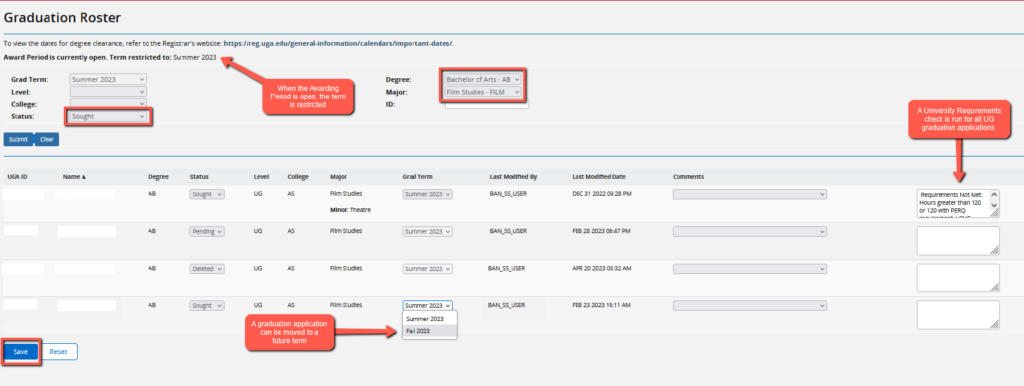
Graduation Clearance Offices (GCO) may use the guide below to assist them in updating graduation rosters for certificates and degrees.
Degree Clearance
Dec15Degree Clearance BeginsJan5Degree Clearance DeadlineMay11Degree Clearance BeginsMay24Degree Clearance Deadline
Graduation Roster Processing Guide
- Login to Athena
- Enter your UGA MyID and password
- Enter your Duo Credentials
- Click on the Advisor Services tile
- Click on the Advising & Graduation menu
- Select Graduation Roster Processing
- Select a Grad Term
If the awarding period is open, the graduation term will be restricted to the current term. All degree and certificate graduation applications you are authorized to clear will display.
- You can filter your search results by using the filter options
- Select a degree or certificate program from the Degree dropdown menu
- Click on the Status filter and select Sought
- Select Search
- Changes to an application
- You can move an application to a future term and add a comment if applicable.
- Select Save to submit changes.
- You can update an application status to Pending or Deleted.
- Select Save to submit changes.
- A check for University Requirements will automatically run for undergraduate graduation applications. If there are missing requirements, a comment will post and the status will not update. This check includes:
- Legislative – Constitution US
- Physical Education Requirement
- Experiential Learning Requirement
- Institutional GPA is less than 2.0
- Overall Credits earned is below 121
- You can move an application to a future term and add a comment if applicable.
You will need to contact the Office of the Registrar at regsupp@uga.edu if a graduation application has a locked minor and needs to be deleted.

Questions?
For technical support, email helpdesk@uga.edu.
For faculty support, email regsupp@uga.edu.