Questions about which courses should be included in your Program of Study are best directed to your Graduate Program Administrator.
Questions about the approval process, statuses, or revisions are best directed to your Graduate Program Administrator or the Graduate School.
Any issues related to the DegreeWorks platform (audits, plans, etc.) can be directed to the DegreeWorks Team in the Office of the Registrar.
The information in DegreeWorks is refreshed each night. Any changes made to your record (e.g., grade changes or classes added / dropped) will be seen in DegreeWorks within 24 hours.
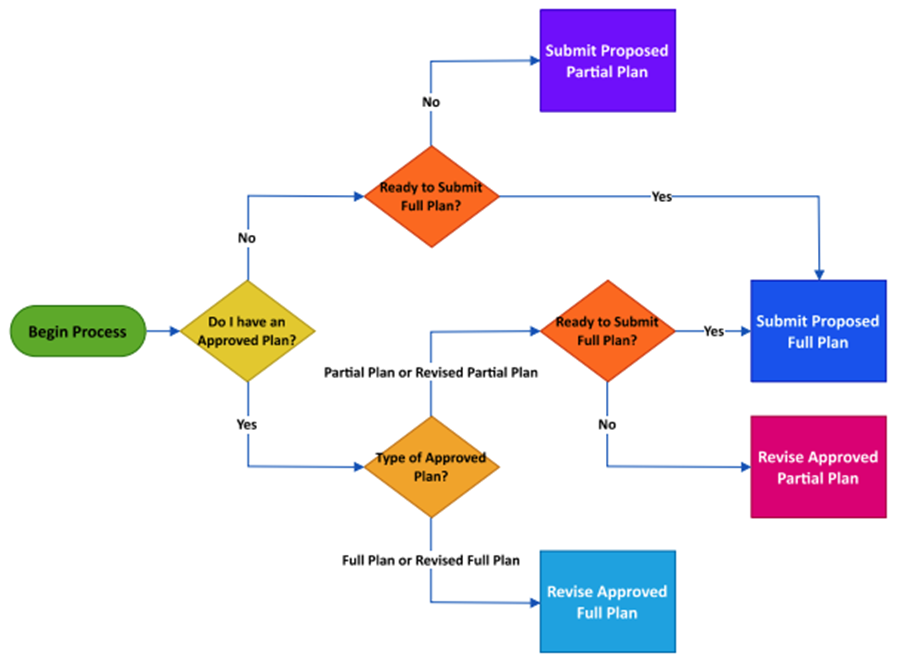
You should submit a Full Plan as soon as possible. If you are not ready to submit a proposed Full Plan, you have the option of submitting a proposed Partial Plan of Study for one or two semesters.
If a plan was previously submitted and approved in Grad Status, the plan was migrated to DegreeWorks and available to view in the system. Otherwise, a new Program of Study will need to be created using the Plans tool in DegreeWorks and submitted for review and approval.
Graduate Program requirements were added to the Bulletin starting in Fall 2025. Therefore, course requirements are in DegreeWorks beginning with bulletin term Fall 2025. A Program of Study can be created for any student using the Plans tool.
Users can create as many Programs of Study as needed using the Plans tool in DegreeWorks. Only one Program of Study per major can be marked as Active and submitted for review and approval.
The Active checkbox is the trigger that sends your Program of Study to the Graduate School for review and approval. Therefore, the best practice is to mark the Program of Study as Active only when ready to submit it for review.
Submit Proposed Partial Plan indicates that the Program of Study contains only a portion (one or two semesters) of required coursework and requirements to complete the degree, and it is ready for review.
Revise Approved Partial Plan is used when a partial Program of Study has already been approved and imported into DegreeWorks but modifications are needed. These Plans are intended to replace the existing Program of Study and will be reviewed for revision approval.
Submit Proposed Full Plan indicates that the Program of Study contains all coursework and requirements necessary to complete the degree, and it is ready for review.
Revise Approved Full Plan is used when a full Program of Study has already been approved and imported into DegreeWorks but modifications are needed. These Plans are intended to replace the existing Program of Study and will be reviewed for revision approval.
Excess Credits are general elective courses that cannot be used to complete requirements. If courses in this section should be counted towards your Program of Study, discuss with your Graduate Program Administrator and use the Plans tool to incorporate these courses in a Program of Study as appropriate.
The Graduate School will send an approval notification to the student’s UGA email address.
The description of your Plan in DegreeWorks will also change to include the word Approved.
When a Program of Study is denied, a notification will be sent to the student’s UGA email address.
There are two types of denied Plans:
AUTOMATICALLY DENIED PLANS
Plans will be automatically denied if an incorrect Plan Status was selected. (Example: You submitted a Partial Plan when you already have an approved Full Plan.)
To resolve the error, open the denied Plan to review Plan Notes and determine the appropriate Plan Status.
Select “Save as Copy” to create a new Plan and make the necessary changes. Update the Plan Description, select the appropriate Plan Status, and make the plan Active to submit it for review. If you are unsure which Plan Status to select, please email [email protected] for assistance.
PLANS THAT DID NOT PASS THE APPROVAL PROCESS
A reviewer may deny a Plan due to insufficient or incorrect coursework.
To resubmit, open the denied Plan to review Plan Notes to determine what needs to be corrected. Select “Save as Copy” to create a new Plan and make the necessary changes. Update the Plan Description, select the Plan Status, and mark the new plan as Active to submit it for review. Contact your GPA if more information is needed.